
- Home
- Industries
- Grab hire
Grab hire software that runs the job from quote to disposal.
Manage enquiries, pricing, grab lorries, drivers, collections, waste records, disposal evidence and invoices in one connected system.
- Your own rates
- Vehicles & drivers
- Waste records
- Disposal evidence
14-day free trial · Cancel at any time


- 01Enquiry
- 02Quote
- 03Booking
- 04Grab lorry
- 05Collection
- 06Waste record
- 07Disposal
- 08Invoice
The grab takes minutes. The paperwork around it doesn’t.
A grab-hire job might start with a phone call and end at a transfer station, but there’s a lot to keep connected in between: the customer, the price, the lorry, the driver, the waste, the tonnage, where it went, the proof and the payment.
- Phone enquiryA missed call
- QuoteWorked out in the cab
- DriverA WhatsApp message
- Grab lorryThe whiteboard
- Collection addressA text from the customer
- Waste typeThe driver’s memory
- LoadA guess at the tonnage
- TipWherever was open
- ReceiptIn the door pocket
- InvoiceA spreadsheet, later
One Oprivo job

Price the load using your own rates.
Build quotes around the way your business actually charges: by the load, the material, the volume or the tonne, with your labour, travel and extra charges on top.
- Your own rate cards, and a card of their own for contractors who get a different price
- Soil, rubble, hardcore, plasterboard, mixed waste and any other material at your own rate per tonne, kg, m³ or item
- Labour, travel, access and your own surcharges added the same way every time
- A PDF quote, stored exactly as it was sent
- Your customer accepts online from a secure link, and the job is created
- A deposit requested on acceptance where you need one
Your own price lists are on every plan. Compare plans.


Know which truck, which driver and where they’re going.
Accepted work moves into the same calendar the office uses. Assign the grab lorry and the driver, schedule the collection and keep the day’s work in view.
- Day, week, crew and vehicle views
- The lorry and the driver assigned to each visit
- Load space and payload on every vehicle, with a warning when a booking is bigger
- A vehicle check due before the lorry goes out
- Several visits on one job, for return trips and multi-day muck away
- Jobs without a date listed until they’re scheduled
The driver gets the job. The office gets the record.
Drivers use Oprivo on their phone. They see the work assigned to them, do the vehicle check, start the job and record the collection while they’re standing beside it.


- Assigned work only
- Pre-use vehicle checks
- Collection address and job notes
- Loads recorded on site
- Photos and evidence
- Customer sign-off
Record what the grab actually took.
Capture the waste as part of the job, rather than rebuilding the record afterwards.
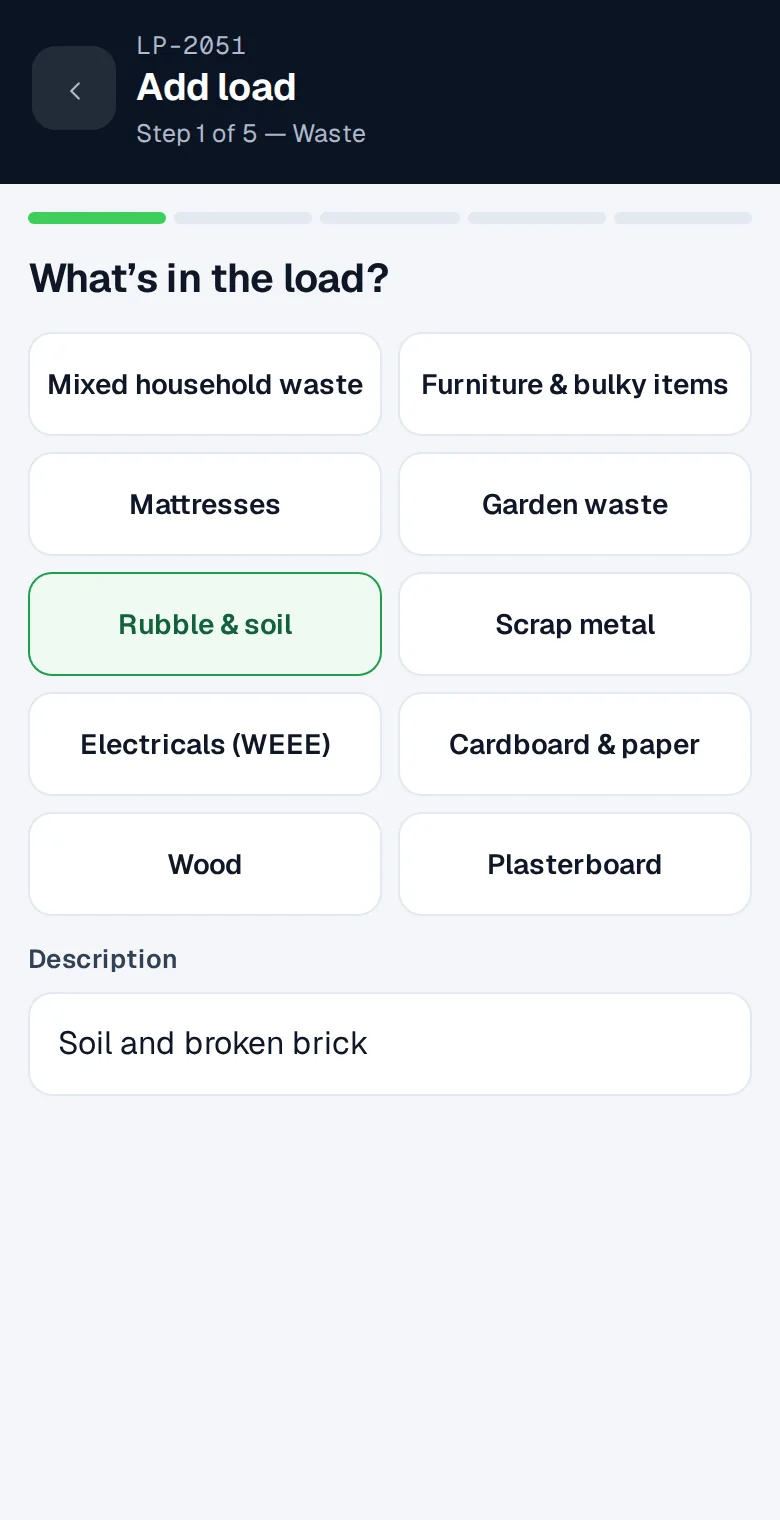
- MaterialRubble & soil
- EWC17 05 04
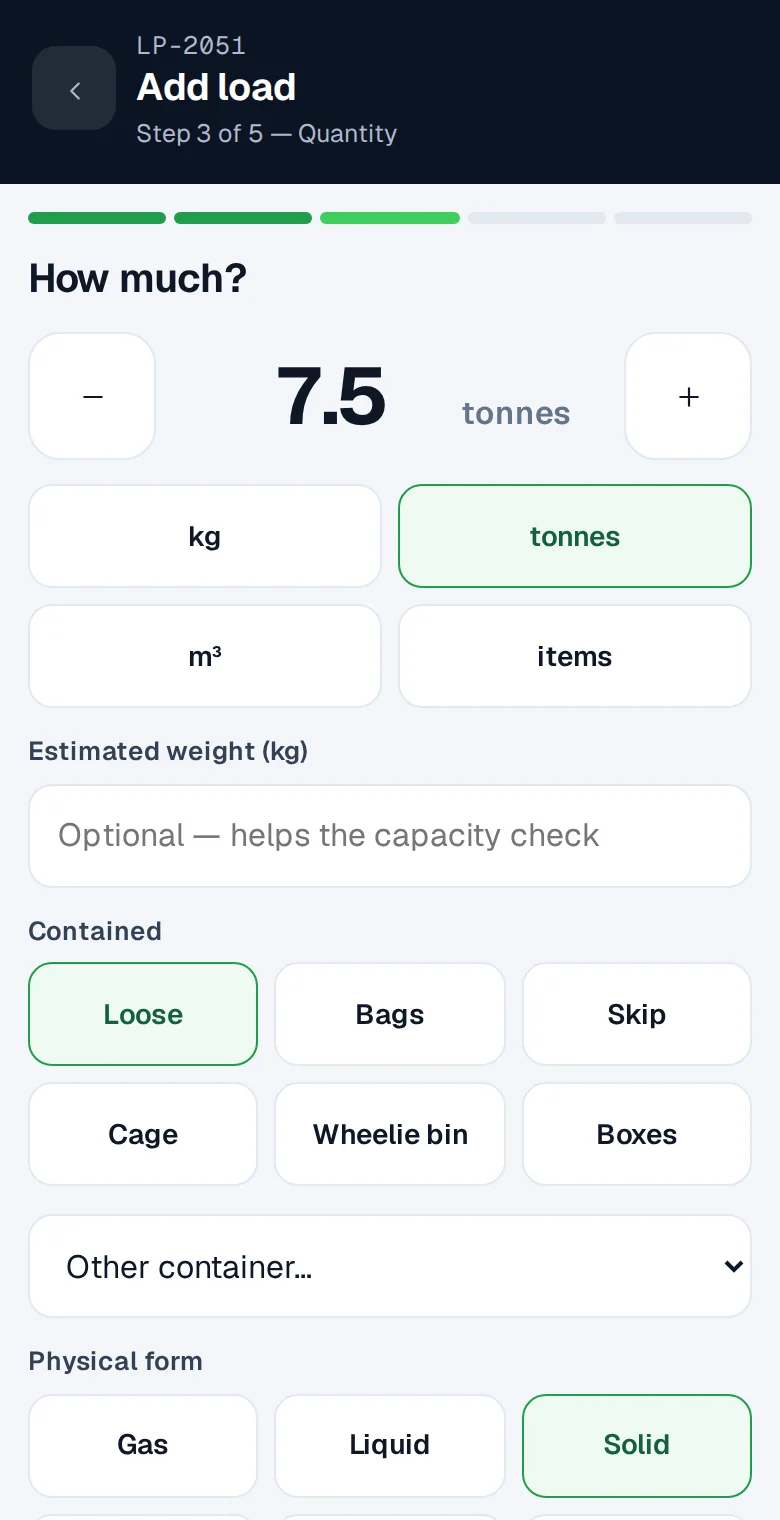
- Quantity7.5 tonnes
- VehicleFrom the booking
- DriverFrom the booking
- DestinationYour tip
- EvidenceTicket & receipt
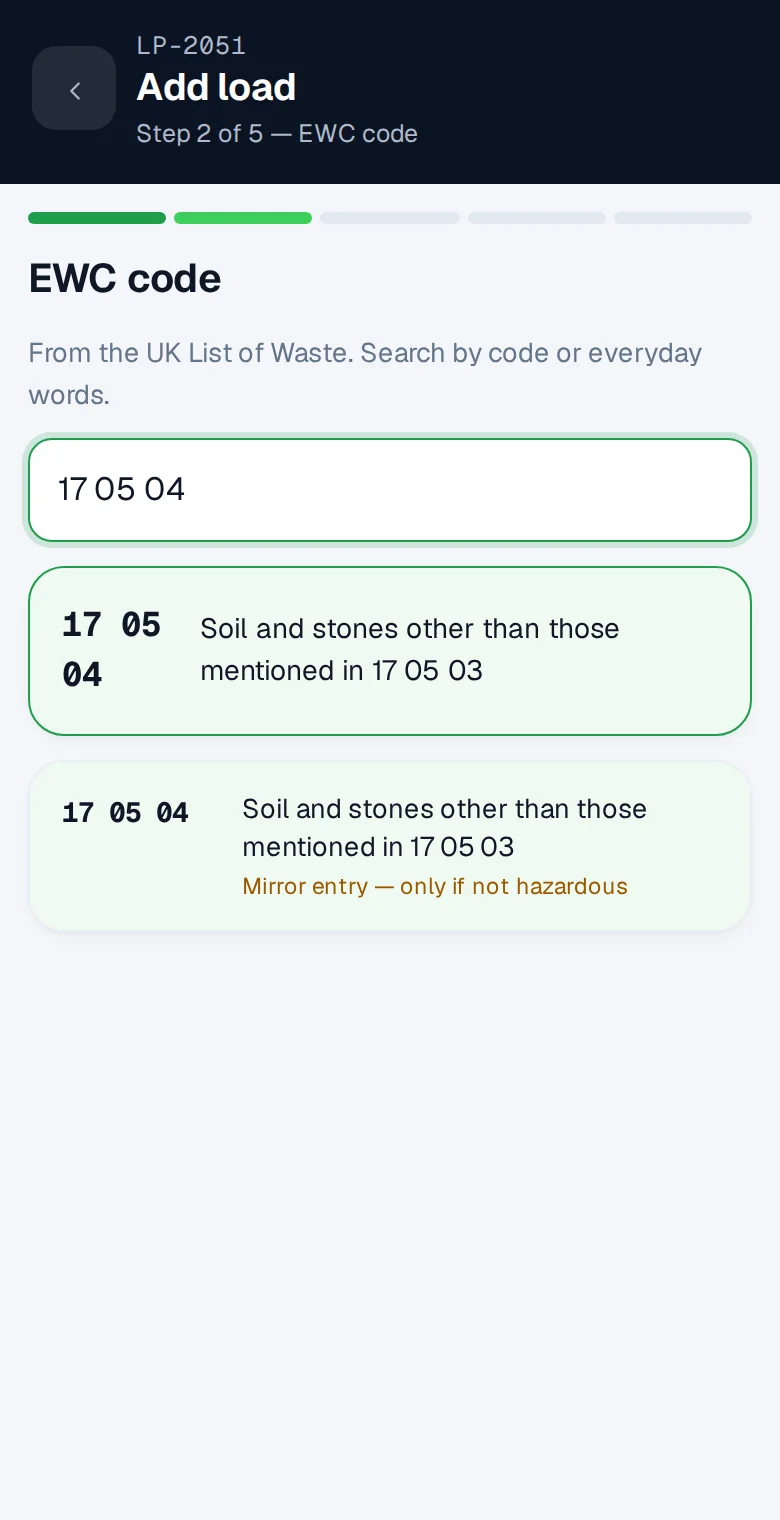
- The waste type, with a plain-language description
- The EWC code, picked from the UK List of Waste, never typed in
- Mirror entries flagged, so a hazardous load isn’t coded as safe by mistake
- Quantity in tonnes, kg, m³ or items, and how it was contained
- Several loads on one job, each with its own record
- Every load stays on its job, with the customer, lorry and driver
Oprivo reports receipts to the government’s digital waste tracking service for permitted sites you run. Collection work joins the service in the carrier phase, planned for October 2027. How Oprivo handles digital waste tracking.


The collection doesn’t disappear when the truck leaves site.
Keep the destination and the disposal evidence on the same job, so the office can see where the material went and what proof came back.
- External tips, transfer stations and recycling sites saved as destinations, with their permit reference
- The destination recorded against each load
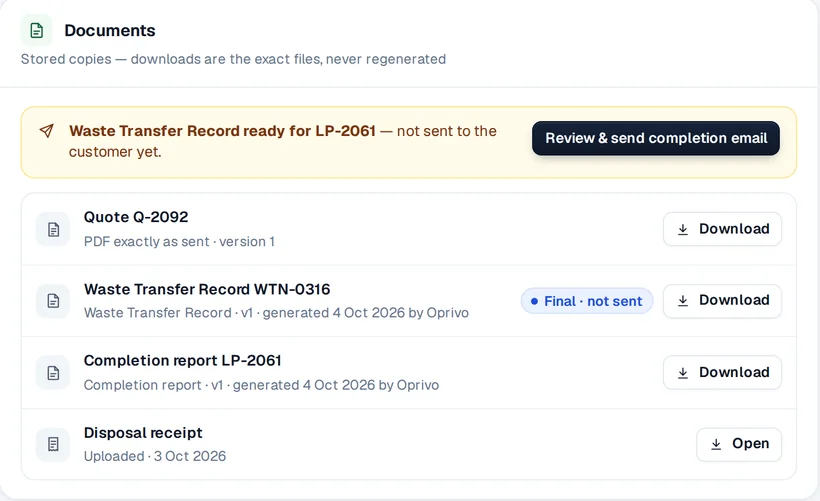
- Weighbridge tickets and disposal receipts attached to the load
- Collection and site photos
- Waste transfer documents generated from the record
- All of it connected to the load and the job
Tipping at someone else’s site is standard Oprivo. You don’t need the Sites & Yards module to take a load to an external transfer station.
Your grab wagons are part of the workflow too.
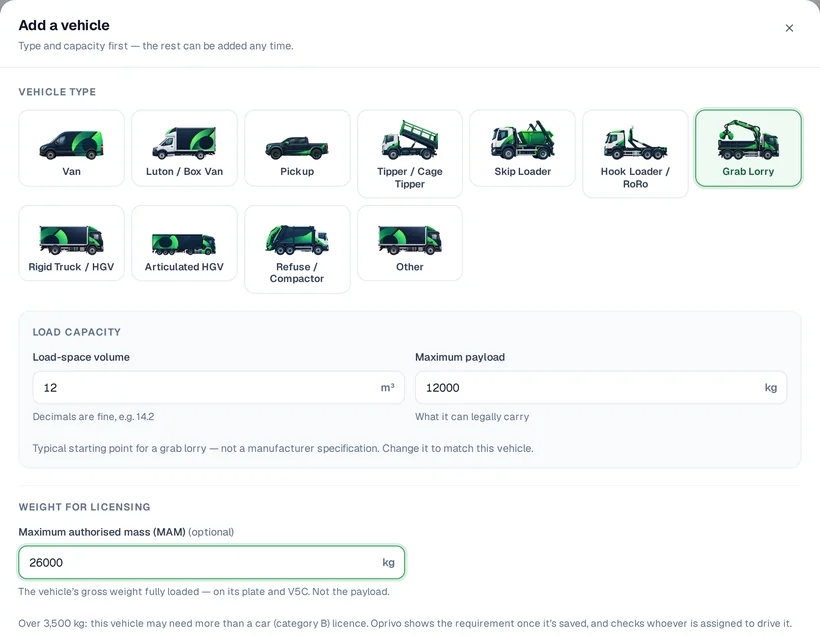
- Registration, make and model, and vehicle type
- Load space and payload limits
- Maximum authorised mass
- A default driver
- Status: available, in use, needs a check, off road
- MOT due date
- Daily checks on the driver’s phone
- Defects reported, and anything unsafe takes it off the road
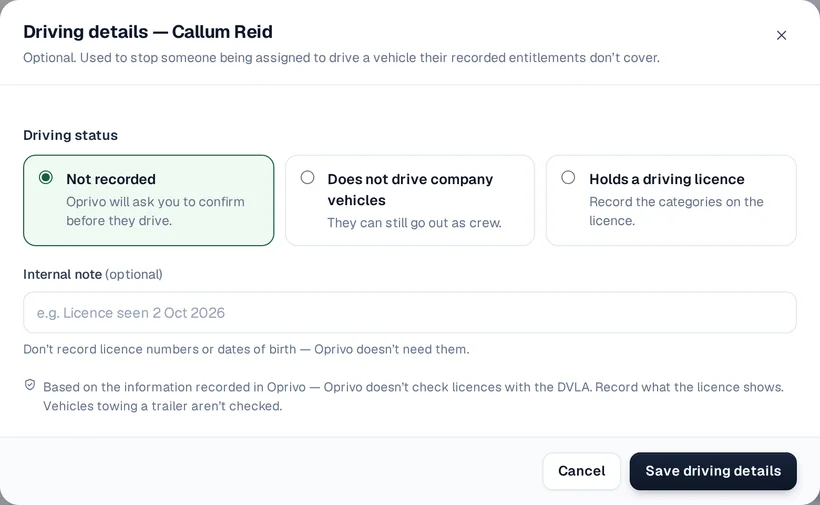
The right licence for the lorry. Record each driver’s licence categories and the lorry’s maximum authorised mass, and Oprivo stops someone being assigned to drive a vehicle their recorded entitlements don’t cover. It works from what you record. Oprivo doesn’t check licences with the DVLA.


Quote it. Do the work. Invoice it.
The commercial record and the job are the same record, so nobody rebuilds the job when it’s time to ask for the money.
- Deposits where you need them
- Payment requests for a deposit or a balance
- Bank transfer and cash recorded against the job
- An invoice from the completed job, with anything already paid taken off
- Payment receipts as PDFs
- The customer’s payments kept on the job
From the first call to the final proof, it’s one record.
Oprivo’s advantage isn’t a waste form. It’s that the waste information lives inside the system you already use to run the work, so the record is complete because the job is.
- 01Enquiry
ENQ-2065 - 02Quote
Q-2092 - 03Booking
BK-0010 - 04Grab lorry
ZK72 WST - 05Driver
Lewis Grant - 06Collection
Started 06:52 - 07Waste record
LOAD-0316 - 08Disposal
Whinmoor - 09Evidence
Disposal receipt - 10Invoice
Create invoice

If material comes back to your site, Sites & Yards extends the same record.
Most grab-hire work never needs it. For operators who bring collected material back to their own yard to sort, store or send on later, the Sites & Yards module adds:
- Your own sites and areas
- Incoming-load records at the gate
- Yard stock, by area and batch
- Sorting and storage areas
- Intake photos
- Moving waste between your own sites
- Sending it on later from yard stock
Standard grab hire Oprivo Core
- Customer site
- Grab collection
- External tip or transfer station
Back to your own yard + Sites & Yards
- Customer site
- Grab collection
- Your yard: stock & sorting
- Sent on later
Turn your grab‑hire website into another route to work.
Oprivo Web Tools put a request form on your own website. What the customer sends lands in Oprivo as an enquiry, ready to quote from the same rates you already use.
- A job request form on your own website
- The collection address, access and preferred dates captured up front
- Photos from the customer, where you ask for them
- Requests arrive in Oprivo as enquiries, not emails
- Instant prices from your own online rate card, for the services you choose
Web Tools are included on Business, or £19.99/month on Growth. See Web Tools.


Built for the way grab‑hire businesses actually work.
Independent grab-wagon operators, muck-away and aggregates firms, excavation and construction waste collectors, and multi-vehicle grab-hire fleets.


Photography is illustrative. These aren’t Oprivo customers.
Muck away
Spoil off site by the load, priced per load or per tonne.
Soil removal
Topsoil and subsoil from landscaping and garden jobs.
Hardcore & rubble
Brick, block and concrete, at your own rate.
Construction waste
Builders and developers on a rate card of their own.
Site clearance
Several loads over one or more days, on one job.
Garden & green waste
Green waste and timber with its own code and destination.
Excavation spoil
Footings, trenches and drainage dig-outs.
Multiple-load jobs
Each load recorded separately, with its own ticket.
Grab hire software, answered.
Something else? See all questions or ask us.
Can Oprivo manage grab‑hire jobs?
Yes. A grab-hire job runs on Oprivo Core: the enquiry, quote, booking, lorry and driver, the collection, the waste record, the disposal destination, the evidence and the payment all sit on one job.
Can I use my own grab‑hire prices and rate cards?
Yes. Rate cards price by volume, weight, items, labour, travel and access, with waste charges per tonne, kg, m³ or item, and a customer can have a rate card of their own. Rate card pricing is on Growth and above.
Can I assign a grab lorry and driver to each job?
Yes. Each visit on the calendar has its crew and vehicle, and the person driving. If you record licence categories and the lorry’s maximum authorised mass, Oprivo stops someone being assigned to drive a vehicle their recorded entitlements don’t cover.
Can drivers use Oprivo on their phones?
Yes. The field app shows each driver their own work for the day, the vehicle check to do first, the job’s address and notes, and lets them record loads, photos and the customer’s sign-off on site.
Can Oprivo record soil, rubble and construction waste?
Yes. Rubble and soil is one of the load types in the field app, and any waste can be recorded with a plain-language description and its EWC code.
Can I record EWC codes and waste quantities?
Yes. Codes are picked from the UK List of Waste rather than typed in, mirror entries are flagged, and quantities are recorded in tonnes, kg, m³ or items.
Can I attach weighbridge tickets and tip receipts?
Yes. Weighbridge tickets, disposal receipts and photos are attached to the load, and the load shows which evidence is still outstanding.
Do I need Sites & Yards for grab hire?
No. A standard grab-hire job that collects material and takes it to an external disposal or transfer facility can be managed in Oprivo Core. Sites & Yards is for operators who bring waste back to their own site for storage, sorting or later disposal.
Can I invoice the customer through Oprivo?
Yes. A completed job is invoiced from the job itself, for its value with any deposit or part payment already taken off. Deposits, payment requests, and bank transfer or cash payments are recorded against the same job.
Can Oprivo handle multiple loads for the same job?
Yes. A job can have several visits and several loads, and each load has its own waste record, destination and evidence.
Start with 14 days free.
Set up your vehicles, add your rates and run a real grab-hire job through Oprivo.
- 14-day free trial
- Cancel at any time
- No per-job charges