
- Home
- Industries
- Waste removal
Waste removal software that proves where every load went.
For rubbish removal, man-and-van and waste collection businesses that are tired of stitching the day together from a diary, a WhatsApp group and a pad of transfer notes.
14-day free trial · Cancel at any time


- 01Enquiry
- 02Quote
- 03Schedule
- 04Collect
- 05Load
- 06Transfer note
- 07Tip & evidence
- 08Complete
The work is simple. Keeping track of it isn’t.
A typical job touches a phone call, a quote, a diary slot, a van, a tip and a piece of paper. Every hand-off is somewhere for a detail to go missing.

From the call to the tip, in order.
- 01Enquiry
Logged once with the address, what’s going and when. Nothing gets retyped later.
- 02Quote
Priced by volume, band, weight or item, with labour, access and travel. Accepted quotes become jobs.
- 03Schedule
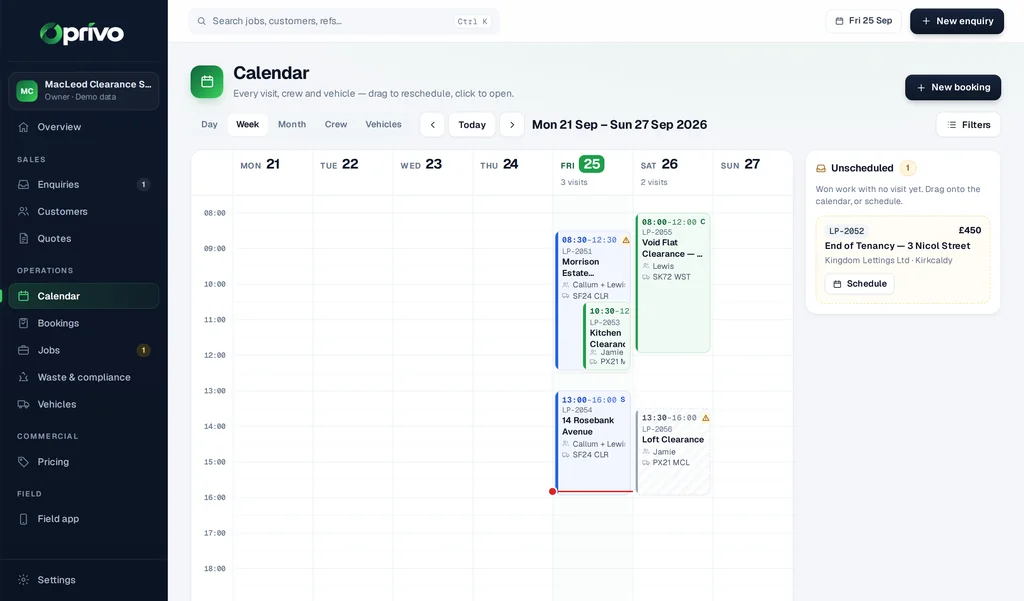
Dragged onto a day, a crew and a vehicle, with clashes, off-road vans and capacity checked.
- 04Collect
The crew check the vehicle, start the job and photograph the before.
- 05Load
What’s in the load and its EWC code, the carrier and the receiving site.
- 06Transfer note
Signed on the phone and frozen once signed. Later changes create a new version.
- 07Tip & evidence
Weighbridge ticket and disposal receipt attached to the load.
- 08Complete
After photos and sign-off, then the job is complete with its report.

Duty of care is easier to meet when the record builds itself.
Carriers must describe the waste they move, pass it to someone authorised to take it, and keep the transfer paperwork. Oprivo captures that information during the job, so it’s complete when you need it, not reconstructed from memory.
Coded, not typed
Waste codes are picked from the UK List of Waste, with hazardous entries flagged.
Right destination
Receiving sites are kept with their permit or exemption reference, copied onto the transfer note.
Nothing overwritten
Signed notes are frozen, rejections are recorded, and every change is in the audit trail.


Using Oprivo doesn’t make a business compliant on its own. It helps you capture and keep the information and evidence you’re responsible for. How Oprivo approaches compliance


The right van, checked and not overloaded.
- Load space and payload for each vehicle
- Warnings when a booking is bigger than the van
- Daily checks on the driver’s phone: unsafe means off the road
- Crew and vehicle clashes caught when you book
Guides for this work
All guides- Starting a clearance businessCarrier registration, vehicles, where the waste goes and paperwork.Read the guide
- How to price a house clearanceVolume, awkward items, access, labour and travel, as a price list.Read the guide
- EWC codes for clearance, skip and grab workThe codes these trades use most, mirror entries and upholstered seating.Read the guide
Waste removal software, answered.
Something else? See all questions or ask us.
What does waste removal software do?
It runs a rubbish removal or man-and-van job from start to finish in one place. In Oprivo the enquiry, the quote, the booking, the crew and van, the load, the waste transfer note and the tip evidence all sit on the same job, so nothing is retyped and nothing lives on a scrap of paper.
Can I quote from my own prices?
Yes. Rate cards price by volume, bands, weight, items, labour, access and travel, with VAT, and apply the same way on every quote. Customers can view and accept a quote online, and accepting it creates the job. Rate card pricing is on Growth and above.
Can the crew sign waste transfer notes on a phone?
Yes. The transfer note is built from the load: what is in it, its EWC code, the carrier and the receiving site. It is signed on the phone and frozen once signed. A later change creates a new version and keeps the old one.
Will Oprivo stop a van being overloaded or double-booked?
Oprivo warns when a booking is bigger than the van’s recorded load space or payload, refuses to book a van that is off the road, and blocks a crew or van being booked in two places at once. An owner can override a clash, and the override is recorded.
How do I prove where the waste went?
Each load records its receiving site with that site’s permit or exemption reference, which is copied onto the transfer note. The weighbridge ticket and disposal receipt are attached to the load, and if a load is turned away, the rejection and the new destination are recorded without overwriting the original.
Is Oprivo suitable for a one-van business?
Yes. The Operator plan is £39.99/month for one person who runs both the office and the field app, with one vehicle. It includes enquiries, quotes, the calendar, the field app, waste records, deposits and payment requests. Rate card pricing starts on Growth.
Does Oprivo make my business compliant?
No software can do that for you, and your duty of care stays yours. Oprivo captures the waste description, EWC code, carrier, destination, signed transfer note and disposal evidence while the job happens, so the record is complete when you need it.
Start with 14 days free.
Set Oprivo up around your operation, explore the tools and see how it fits your business before committing.
- 14-day free trial
- Cancel at any time
- No per-job charges